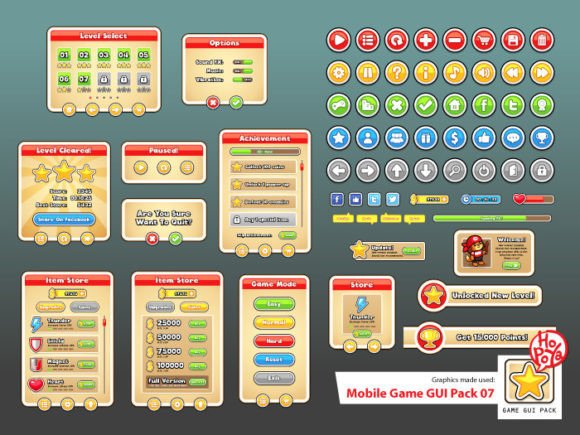
Mobile Game GUI Pack 07: Design Your Next Hit
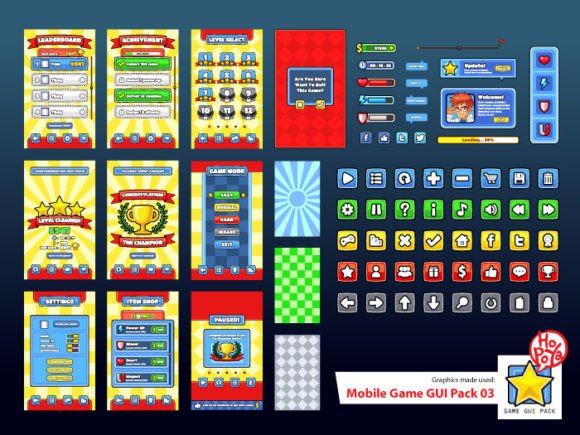
Creating a visually stunning and user-friendly interface is a critical step in game development that can make or break the player experience. For indie developers and designers seeking a polished, professional look without starting from scratch, a comprehensive asset kit can be a game-changer. The Mobile Game GUI Pack 07 is a complete graphical user interface toolkit designed specifically for 2D mobile games, offering a versatile and customizable collection of elements to bring your creative vision to life efficiently.
This pack is built around flexibility and ease of use. It includes over 40 customizable buttons, each available in five different color variations, allowing you to maintain a consistent color palette across your game's menus, HUD, and interactive elements. Beyond buttons, the collection provides customizable windows, panels, icons, and other essential game elements. This means you can quickly adapt the assets to match your game's unique style, whether you're designing a vibrant puzzle game, a sleek strategy title, or a charming adventure.
What's Inside and Why It Matters
The true value of a design asset lies in its quality and adaptability. The Mobile Game GUI Pack 07 delivers on both fronts. It includes vector AI and EPS10 files, which are perfect for designers who need to scale, edit, and recolor assets in Adobe Illustrator or other vector software without losing quality. For those working in game engines or other platforms, the transparent PNG files provide ready-to-use assets with clean edges.
Furthermore, the pack specifies the fonts used: Cloudy With a Chance of Love and Comic Neue Angular. Choosing the right typeface is crucial for establishing your game's personality. These fonts, likely chosen for their readability and friendly aesthetic, contribute to a cohesive and engaging visual style. When selecting a GUI pack, always check the included fonts to ensure they align with your game's tone and are licensed for your intended use.
Creative Applications and Practical Tips
While designed for mobile games, the principles and assets within this pack can inspire a wide range of creative projects. Think beyond the screen:
- Prototyping & Pitch Decks: Use the clean GUI elements to create interactive prototypes for investor presentations or team feedback sessions.
- Game Art & Marketing: The buttons and windows can be incorporated into promotional graphics, social media posts, or even merchandise mockups.
- UI/UX Education: The structured elements serve as an excellent study tool for understanding layout, spacing, and visual hierarchy in interface design.
When integrating assets like these, remember a few key practices. First, test readability at all sizes, especially for buttons and text elements on smaller mobile screens. Second, maintain visual consistency by sticking to the provided color schemes and style guidelines. Third, don't be afraid to mix and match with other design assets—pairing these elements with a complementary icon set or background texture can elevate your project further.
Ultimately, a well-curated GUI pack is more than just a collection of files; it's a foundation that saves time, ensures professionalism, and lets you focus on what matters most: gameplay and storytelling. By starting with a robust and flexible toolkit, you empower your project with a polished look from the very first build.